termdom
Build terminal apps with HTML, CSS, and DOM.
TermDOM renders HTML and CSS in the terminal. It draws a real DOM and redraws when it changes, so you can write terminal apps with plain JavaScript or any frontend framework.
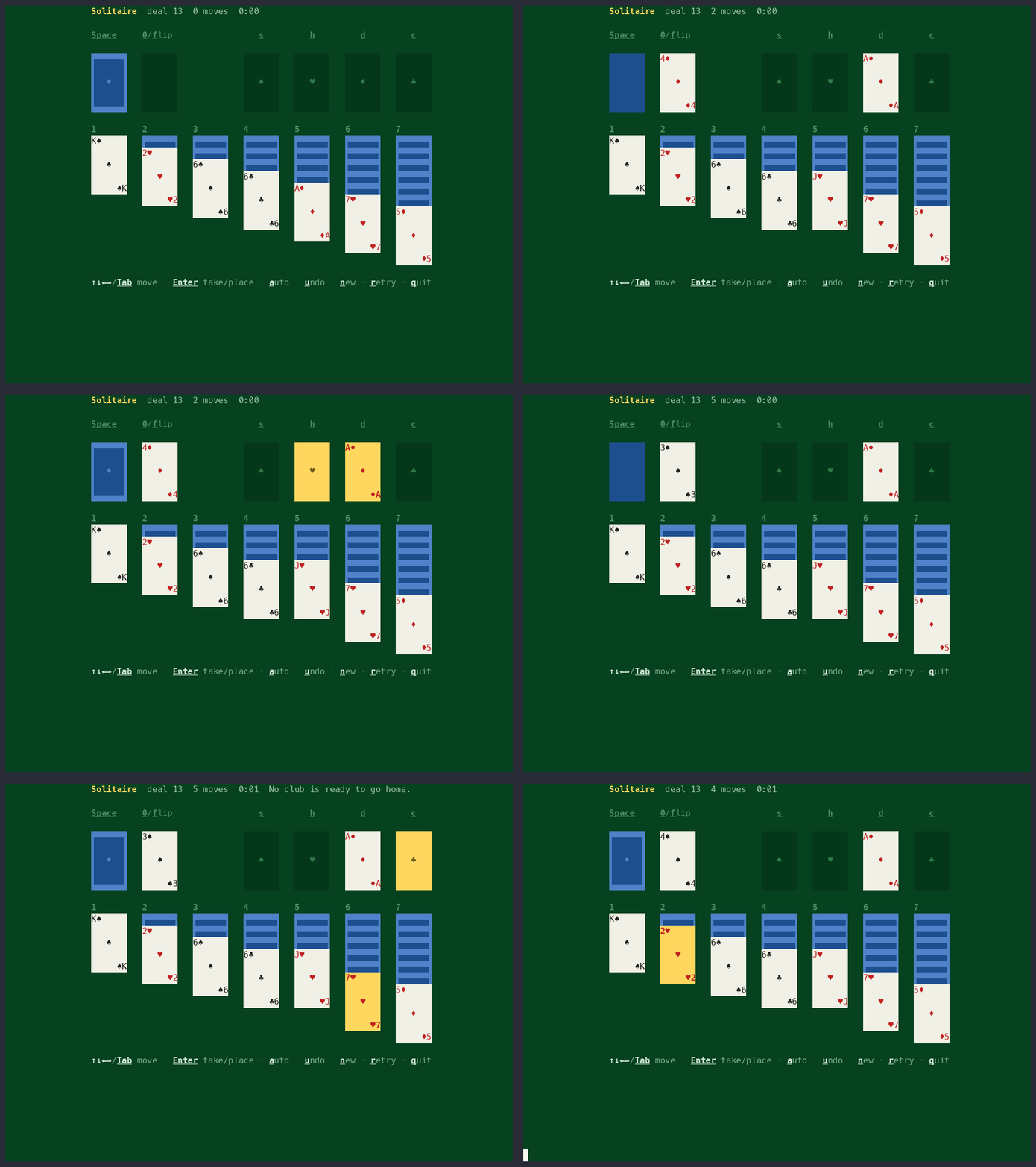
Most terminal UI libraries have their own widgets: a Box, a List, a Screen, each with its own API. TermDOM implements the DOM and CSSOM instead. Make a div, style it, and append it to the body. There's no render call; changes paint on their own.
import {TermDOM} from "@b9g/termdom";

const term = new TermDOM();
term.attach();
const {document} = term;

const heading = document.createElement("div");
heading.style.backgroundColor = "blue";
heading.style.color = "white";
heading.style.padding = "0 1ch";
heading.textContent = "Hello, terminal";

const subtitle = document.createElement("div");
subtitle.style.color = "yellow";
subtitle.style.marginTop = "1px";
subtitle.textContent = "HTML and CSS, drawn with ANSI escape sequences";

document.body.appendChild(heading);
document.body.appendChild(subtitle);
Styling #
Stylesheets and inline styles go through the cascade and are drawn with ANSI escape sequences: colors from the terminal's palette, and bold, italic, underline, and strikethrough as terminal attributes.
import {TermDOM} from "@b9g/termdom";

const term = new TermDOM();
term.attach();
const {document} = term;

document.head.innerHTML = `
  <style>
    p { color: gray; }
    .warm { color: yellow; }
    .warm.hot { color: red; font-weight: bold; }
    a { color: cyan; text-decoration: underline; }
    del { color: #888; text-decoration: line-through; }
    .badge { background-color: blue; color: white; padding: 0 1ch; }
  </style>
`;

document.body.innerHTML = `
  <p>A paragraph made gray by a CSS rule.</p>
  <p class="warm">A class makes this paragraph yellow.</p>
  <p class="warm hot">Two classes beat one: red and bold.</p>
  <p class="warm hot" style="color: green">An inline style beats all rules.</p>
  <p>Text can be <b>bold</b>, <i>italic</i>, <a>underlined</a> or <del>struck through</del>.</p>
  <p><span class="badge">A background</span> paints its cells.</p>
`;
Layout #
Flexbox, grid, tables, and the box model lay out on a grid of
character cells, where 1px and 1ch are both one cell. Text wraps
and reflows when the terminal resizes.
import {TermDOM} from "@b9g/termdom";
const term = new TermDOM();
term.attach();
const {document} = term;

const mainContainer = document.createElement("div");
mainContainer.style.display = "flex";
mainContainer.style.flexDirection = "column";
mainContainer.style.padding = "1px 2px";
mainContainer.style.backgroundColor = "darkblue";
document.body.appendChild(mainContainer);

const header = document.createElement("div");
header.style.display = "flex";
header.style.flexDirection = "row";
header.style.justifyContent = "space-between";
header.style.backgroundColor = "magenta";
header.style.padding = "1px 1px 1px 1px";
mainContainer.appendChild(header);

const headerTitle = document.createElement("span");
headerTitle.textContent = "🚀 TermDOM flexbox";
headerTitle.style.color = "white";
header.appendChild(headerTitle);

const headerSubtitle = document.createElement("span");
headerSubtitle.textContent = "HTML · CSS · DOM → cells";
headerSubtitle.style.textAlign = "right";
headerSubtitle.style.color = "white";
header.appendChild(headerSubtitle);

const contentArea = document.createElement("div");
contentArea.style.display = "flex";
contentArea.style.flexDirection = "row";
contentArea.style.padding = "1px 0 0";
mainContainer.appendChild(contentArea);

const sidebar = document.createElement("div");
sidebar.style.display = "flex";
sidebar.style.flexDirection = "column";
sidebar.style.backgroundColor = "darkgreen";
sidebar.style.padding = "1px";
sidebar.style.whiteSpace = "nowrap";
sidebar.style.flexShrink = "0";
contentArea.appendChild(sidebar);

const sidebarTitle = document.createElement("span");
sidebarTitle.textContent = "📋 Navigation";
sidebarTitle.style.color = "white";
sidebarTitle.style.textAlign = "center";
sidebar.appendChild(sidebarTitle);

const menuItems = ["• Home", "• About", "• Services", "• Contact"];
for (const item of menuItems) {
  const menuItem = document.createElement("span");
  menuItem.textContent = item;
  menuItem.style.color = "white";
  menuItem.style.padding = "0px 1px 0px 1px";
  sidebar.appendChild(menuItem);
}

const mainContent = document.createElement("div");
mainContent.style.display = "flex";
mainContent.style.flexDirection = "column";
mainContent.style.backgroundColor = "darkgray";
mainContent.style.padding = "1px 2px 1px 2px";
contentArea.appendChild(mainContent);

const contentTitle = document.createElement("span");
contentTitle.textContent = "📄 Main Content Area";
contentTitle.style.color = "white";
contentTitle.style.textAlign = "center";
mainContent.appendChild(contentTitle);

const contentText = document.createElement("span");
contentText.textContent =
  "Flex rows and columns, gap, grow and shrink -- resolved by a spec flexbox engine and painted to whole cells. Multi-line markup lays out as in a browser: whitespace between items is not an item.";
contentText.style.color = "white";
contentText.style.padding = "1px 0px 1px 0px";
mainContent.appendChild(contentText);

const featuresContainer = document.createElement("div");
featuresContainer.style.display = "flex";
featuresContainer.style.flexDirection = "row";
featuresContainer.style.padding = "1px 0px 0px 0px";
mainContent.appendChild(featuresContainer);

const features = [
  {title: "🎨 Styling", desc: "One cascade: sheets, inline, var(), :has()"},
  {title: "📐 Layout", desc: "Flex, tables, margin collapsing"},
  {title: "🧩 Widgets", desc: "Inputs and selects as UA shadow trees"},
];

for (const feature of features) {
  const featureCard = document.createElement("div");
  featureCard.style.display = "flex";
  featureCard.style.flexDirection = "column";
  featureCard.style.backgroundColor = "darkcyan";
  featureCard.style.padding = "1px 1px 1px 1px";
  featureCard.style.flex = "1";
  featuresContainer.appendChild(featureCard);

  const featureTitle = document.createElement("span");
  featureTitle.textContent = feature.title;
  featureTitle.style.color = "white";
  featureTitle.style.textAlign = "center";
  featureCard.appendChild(featureTitle);

  const featureDesc = document.createElement("span");
  featureDesc.textContent = feature.desc;
  featureDesc.style.color = "white";
  featureDesc.style.textAlign = "center";
  featureCard.appendChild(featureDesc);
}

const footer = document.createElement("div");
footer.style.display = "flex";
footer.style.flexDirection = "row-reverse";
footer.style.backgroundColor = "darkred";
footer.style.padding = "1px 2px 1px 2px";
mainContainer.appendChild(footer);

const footerText = document.createElement("span");
footerText.textContent = "© 2026 TermDOM";
footerText.style.color = "white";
footer.appendChild(footerText);

const footerVersion = document.createElement("span");
footerVersion.textContent = "v0.1.0";
footerVersion.style.color = "white";
footer.appendChild(footerVersion);
Events #
Input becomes DOM events: keydown at the focused element, click
on the element under the pointer, paste with the pasted text. Tab
moves focus, and :focus styles follow.
import {TermDOM} from "@b9g/termdom";

const term = new TermDOM();

term.attach();
const {document} = term;

const style = document.createElement("style");
style.textContent = `
  .form { padding: 1ch 2ch; }
  .title { color: cyan; font-weight: bold; }
  .field { display: flex; flex-direction: row; padding: 1px 0 0 0; }
  .label { color: white; width: 8ch; }
  input { background: #1d3557; color: white; width: 28ch; }
  input:focus { background: #264f78; }
  .preview { color: #888; padding: 1px 0 0 0; }
  .done { color: green; font-weight: bold; padding: 1px 0 0 0; }
  .hint { color: #666; padding: 1px 0 0 0; }
`;
document.head.appendChild(style);

const form = document.createElement("div");
form.className = "form";
form.innerHTML = `
  <div class="title">New profile</div>
  <div class="field"><div class="label">Name</div><input id="name" type="text" autofocus></div>
  <div class="field"><div class="label">Email</div><input id="email" type="text"></div>
  <div class="field"><div class="label">Handle</div><input id="handle" type="text"></div>
  <div class="preview" id="preview"></div>
  <div class="done" id="done"></div>
  <div class="hint">tab next field · enter submit · ctrl+c quit</div>
`;
document.body.appendChild(form);

const fields = ["name", "email", "handle"].map(
  (id) => document.getElementById(id) as HTMLInputElement,
);
const preview = document.getElementById("preview")!;
const done = document.getElementById("done")!;

function updatePreview(): void {
  const [name, email, handle] = fields.map((f) => f.value);
  preview.textContent = name || email || handle
    ? `» ${name || "?"} <${email || "?"}> @${handle || "?"}`
    : "» start typing to build a profile";
  done.textContent = "";
}

// The standard event: fires on every edit, in any field.
for (const field of fields) {
  field.addEventListener("input", updatePreview);
}

document.addEventListener("keydown", (event: Event) => {
  if ((event as KeyboardEvent).key !== "Enter") {
    return;
  }
  const [name, email, handle] = fields.map((f) => f.value.trim());
  if (!name && !email && !handle) {
    return;
  }
  done.textContent = `✓ saved: ${name || "anonymous"} <${email || "n/a"}> @${handle || "n/a"}`;
});

updatePreview();
Libraries & Frameworks #
Browser libraries work unmodified, and most frontend frameworks work with a little setup.
/**
 * Syntax highlighting by Prism, the browser library, unmodified. It arrives
 * through the imports a web page writes: the library, then a grammar pack.
 *
 * Prism turns source text into markup -- `<span class="token keyword">`,
 * `<span class="token string">`, one class per kind of token. The stylesheet
 * below is a Prism CSS theme (Tomorrow Night), whose rules match those
 * classes and nothing else. TermDOM lays the markup out under the theme and
 * paints the result as cells. A web highlighter and a web stylesheet, drawn
 * in a terminal.
 *
 * Keys: left/right arrows or 1-4 pick the language, q quits.
 */
// Each language pack registers its grammar on the global the core creates, so
// the core loads first. CSS and JavaScript ship in it, so only the rest need
// a line here.
import "prismjs";
import "prismjs/components/prism-typescript.js";
import "prismjs/components/prism-json.js";
import "prismjs/components/prism-python.js";

import {TermDOM} from "@b9g/termdom";
import Prism from "prismjs";

interface Sample {
  id: string;
  label: string;
  code: string;
}

// Samples are inline: nothing is read from disk, so the example runs in the
// browser playground as well as a terminal. Lines stay under 64 columns so
// they fit an 80-column screen beside the gutter.
const SAMPLES: Sample[] = [
  {
    id: "typescript",
    label: "TypeScript",
    code: `// Types are erased before the program runs. Tokens are not.
interface Point {
  x: number;
  y: number;
}

const ORIGIN: Point = {x: 0, y: 0};

export function distance(a: Point, b: Point = ORIGIN): number {
  const dx = a.x - b.x;
  const dy = a.y - b.y;
  return Math.sqrt(dx * dx + dy * dy);
}

const points: Point[] = [{x: 3, y: 4}, ORIGIN];
for (const point of points) {
  console.log(\`distance: \${distance(point).toFixed(2)}\`);
}`,
  },
  {
    id: "css",
    label: "CSS",
    code: `/* A Prism theme is author CSS: token classes in, colours out. */
:root {
  --ink: #cccccc;
  --paper: #2d2d2d;
}

.token.keyword,
.token.builtin {
  color: #cc99cd;
  font-weight: bold;
}

pre[class*="language-"] {
  background-color: var(--paper);
  padding: 0 1ch;
}

@media (max-width: 80ch) {
  .gutter { display: none; }
}`,
  },
  {
    id: "json",
    label: "JSON",
    code: `{
  "name": "@b9g/termdom",
  "version": "0.1.4",
  "private": false,
  "keywords": ["dom", "css", "terminal"],
  "engines": {"node": ">=20"},
  "scripts": {
    "test": "bun test",
    "lint": "eslint ."
  },
  "devDependencies": {
    "prismjs": "^1.30.0",
    "typescript": "^5.9.2"
  }
}`,
  },
  {
    id: "python",
    label: "Python",
    code: `# One grammar per language, one class per kind of token.
from dataclasses import dataclass

SUITS = "♠♥♦♣"


@dataclass
class Card:
    rank: int
    suit: str

    def label(self) -> str:
        names = {1: "A", 11: "J", 12: "Q", 13: "K"}
        return f"{names.get(self.rank, self.rank)}{self.suit}"


deck = [Card(rank, suit) for rank in range(1, 14) for suit in SUITS]
print(len(deck), deck[0].label(), deck[-1].label())`,
  },
];

const term = new TermDOM();

term.attach();
const {document} = term;

const style = document.createElement("style");
style.textContent = `
  body { background-color: #2d2d2d; color: #cccccc; }
  .tabs { display: flex; flex-direction: row; gap: 1ch; padding: 0 1ch; }
  .tab { color: #808080; padding: 0 1ch; }
  .tab.current { color: #2d2d2d; background-color: #cc99cd; font-weight: bold; }
  .pane { display: flex; flex-direction: row; padding: 1px 1ch; overflow: hidden; }
  .gutter { color: #666666; padding-right: 1ch; text-align: right; width: 3ch; }
  .hint { color: #666666; padding: 0 1ch; }

  /* Under 72 columns the gutter costs the source the room it needs, and
     @media answers again on every resize. */
  @media (max-width: 72ch) {
    .gutter { display: none; }
  }

  /* Prism's Tomorrow Night theme, rule for rule. The selectors are the
     classes Prism writes; the terminal resolves the hex to its palette. */
  .token.comment,
  .token.block-comment,
  .token.prolog,
  .token.doctype,
  .token.cdata { color: #999999; }
  .token.punctuation { color: #cccccc; }
  .token.tag,
  .token.attr-name,
  .token.namespace,
  .token.deleted { color: #e2777a; }
  .token.function-name { color: #6196cc; }
  .token.boolean,
  .token.number,
  .token.function { color: #f08d49; }
  .token.property,
  .token.class-name,
  .token.constant,
  .token.symbol { color: #f8c555; }
  .token.selector,
  .token.important,
  .token.atrule,
  .token.keyword,
  .token.builtin { color: #cc99cd; }
  .token.string,
  .token.char,
  .token.attr-value,
  .token.regex,
  .token.variable { color: #7ec699; }
  .token.operator,
  .token.entity,
  .token.url { color: #67cdcc; }
  .token.important,
  .token.bold { font-weight: bold; }
  .token.italic { font-style: italic; }
  .token.inserted { color: #7ec699; }
`;
document.head.appendChild(style);

const tabs = document.createElement("div");
tabs.className = "tabs";
const buttons = SAMPLES.map((sample, index) => {
  const tab = document.createElement("span");
  tab.className = "tab";
  tab.textContent = `${index + 1} ${sample.label}`;
  tabs.appendChild(tab);
  return tab;
});

const pane = document.createElement("div");
pane.className = "pane";
const gutter = document.createElement("pre");
gutter.className = "gutter";
const code = document.createElement("pre");
pane.append(gutter, code);

const hint = document.createElement("div");
hint.className = "hint";
hint.textContent = "←/→ or 1-4 language · q quit";

document.body.append(tabs, pane, hint);

let current = 0;

// `pre` keeps white-space: pre and the pane clips what runs past the right
// edge, so a source line holds one row and the gutter's numbers stay level
// with it at any width.
function show(index: number): void {
  current = (index + SAMPLES.length) % SAMPLES.length;
  const sample = SAMPLES[current];
  buttons.forEach((tab, i) => {
    tab.className = i === current ? "tab current" : "tab";
  });
  const lines = sample.code.split("\n");
  gutter.textContent = lines.map((_, i) => String(i + 1)).join("\n");
  code.innerHTML = Prism.highlight(
    sample.code,
    Prism.languages[sample.id],
    sample.id,
  );
}

show(0);

const bindings: Record<string, () => void> = {
  ArrowRight: () => show(current + 1),
  ArrowLeft: () => show(current - 1),
  q: () => term.window.close(),
};
document.addEventListener("keydown", (event: Event) => {
  const {key} = event as KeyboardEvent;
  const picked = Number(key);
  if (picked >= 1 && picked <= SAMPLES.length) {
    show(picked - 1);
    return;
  }
  bindings[key]?.();
});
Compatibility #
TermDOM follows web standards except where they make no sense in a terminal. The compatibility table lists what's implemented.
Get started #
npm install @b9g/termdomRead the getting started guide, poke at an example on the examples page, or read the source on GitHub.